

go to this link
https://console.cloud.google.com/apis/
- Creat Project > Put Project name > Leave Lovation > Create
- Credentials > Create Credentials > OAuth client ID > Configure Consent screen > External Use
Fill The form

- save and Contineue > save and Contineue > save and Contineue > Back to Dasboard
- Credentials > Create Credentials > OAuth client ID >
- Select aplication type = web Aplication
- Name = Clint name
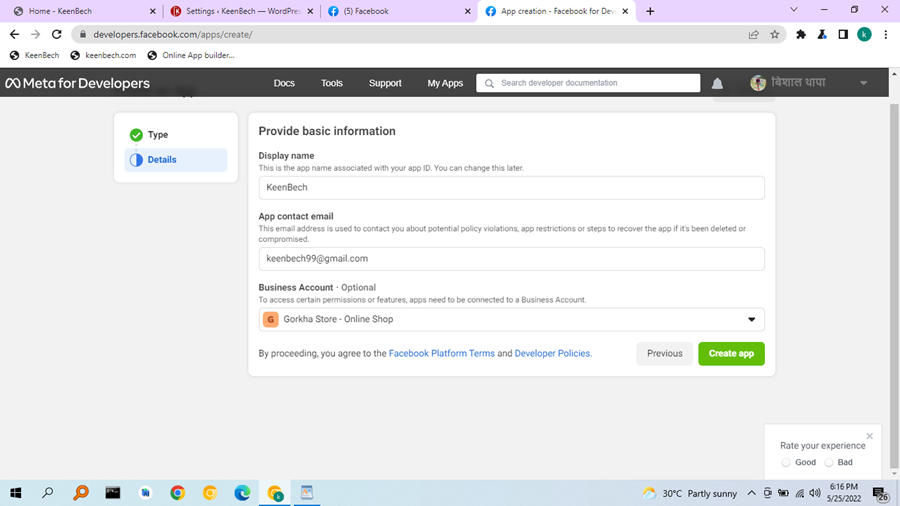
- go to this link : https://developers.facebook.com/apps
> Creat app > Select Business / Next >
- Facebook Login = Click setup > Web > Give URL > Save
- facebook login / Setting ( in down side) /
- Client OAuth login = Yes
- Valid OAuth Redirect URIs = Go to WordPress > Setting > Nextend Social Login / here you find on 12 Number / Copy Valid OAuth Redirect URIs And Past > save Changes
- Setting (in UP side ) / Basic >
- app domains = Your domain name
- Privacy Policy URL = give it
- Terms of Service URL = give it
- Category = give it
- App icon = give it
- Save change
- copy App ID & App secret Past on WordPress Plugine
- Verify > Enable